2. PVE Backup Jobs
On this page we will describe how you can create a backup job on your PVE machine. It is assumed that you have already set up your PBS system and connected your PBS system to your PVE machine as well. With that out of the way we create a backup job to your PBS in the following way
1. From your Dashboard go to > Datacenter > Backup > +Add
2. Then you will be presented with the following screen
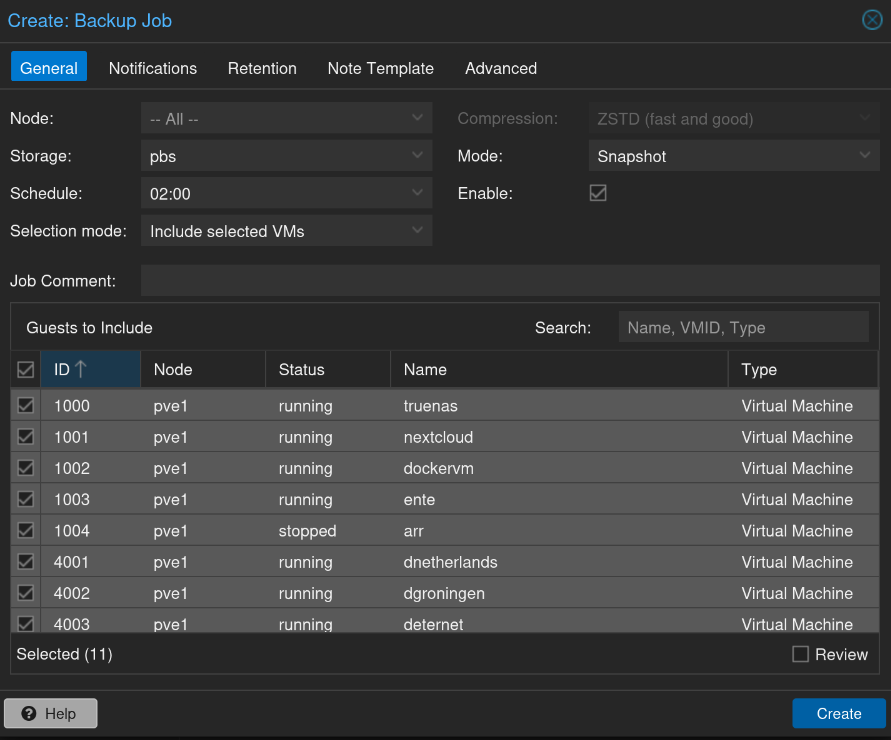
3. Now make sure you select for Storage: PBS and not your local storage
4. Then set a schedule i.e how often you want the backup job to run. So what to choose ? Well I like to make sure that my backups are taken before the Update schedule has run for all my containers in Dockhand. In my situation I have Dockhand checking for updates every day at 03:00 and also update them automatically if it is available. This comes with some risk because automatic updates could break things. Therefore I like to take my backups one hour before. In this situation if I wake up and all is to hell then I can just rewind to the latest backup that was taken at 02:00. So depending on your Update schedule I would recommend to schedule it 1 hour before the update schedule ;)
5. Perfect, now we need to look at retention. That is how long will different backups be kept before they are garbage collected. From there Wiki you have the following options
For this example, we assume that you are doing daily backups, have a retention period of 10 years, and the period between backups stored gradually grows.
keep-last=3- even if only daily backups are taken, an admin may want to create an extra one just before or after a big upgrade. Setting keep-last ensures this.keep-hourlyis not set - for daily backups this is not relevant. You cover extra manual backups already, with keep-last.keep-daily=13- together with keep-last, which covers at least one day, this ensures that you have at least two weeks of backups.keep-weekly=8- ensures that you have at least two full months of weekly backups.keep-monthly=11- together with the previous keep settings, this ensures that you have at least a year of monthly backups.keep-yearly=9- this is for the long term archive. As you covered the current year with the previous options, you would set this to nine for the remaining ones, giving you a total of at least 10 years of coverage.- We recommend that you use a higher retention period than is minimally required by your environment; you can always reduce it if you find it is unnecessarily high, but you cannot recreate backups once they have been removed.
6. So in my personal case it looks like this
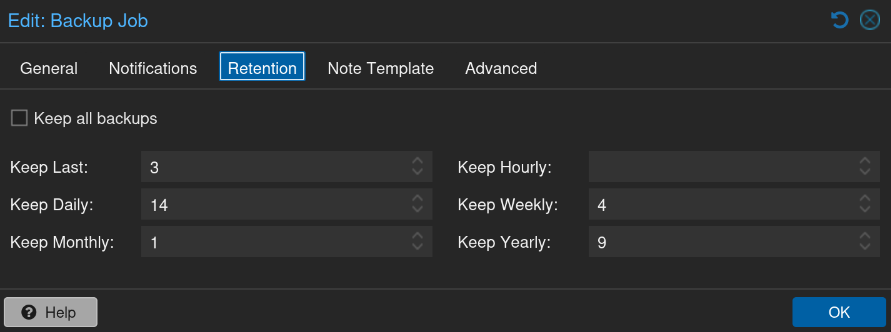
7. Perfect then hit OK and create the backup job!!!!
8. Now,