
1. Restore a Proxmox ZFS pool
Source: Oneuptime
In the occasion that one of your Proxmox ZFS pools becomes degraded then this is one of the ways to restore your pool. Such a pool could be an OS, VM or a storage pool. Now, once you receive a proxmox notification (Don't forget to setup Proxmox notifications via Email or NTFY) that your pool is degraded you will see in the Proxmox GUI the following:
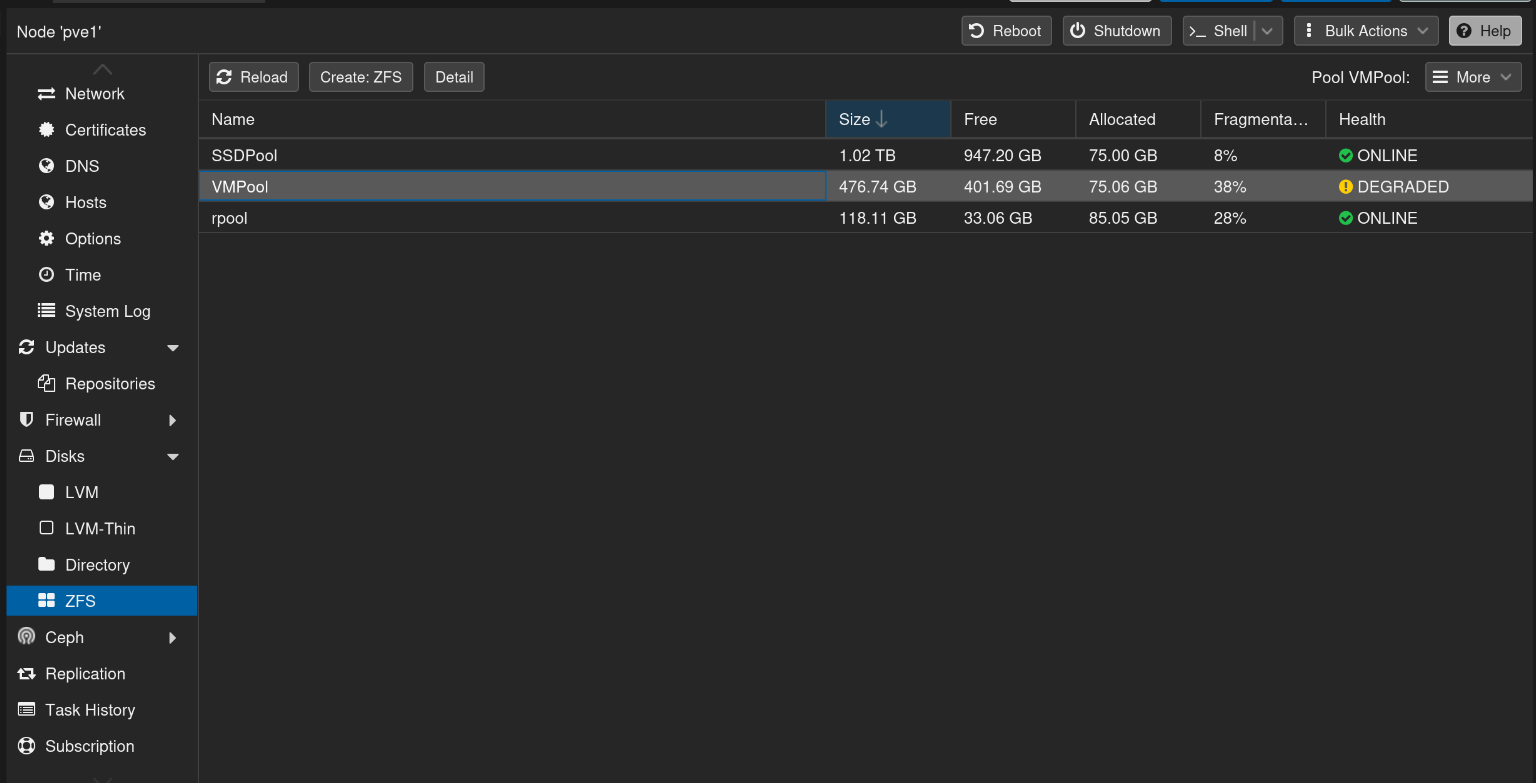
1. If you then double click on the Degraded pool you will see which drive is actually degraded and needs to be replaced.
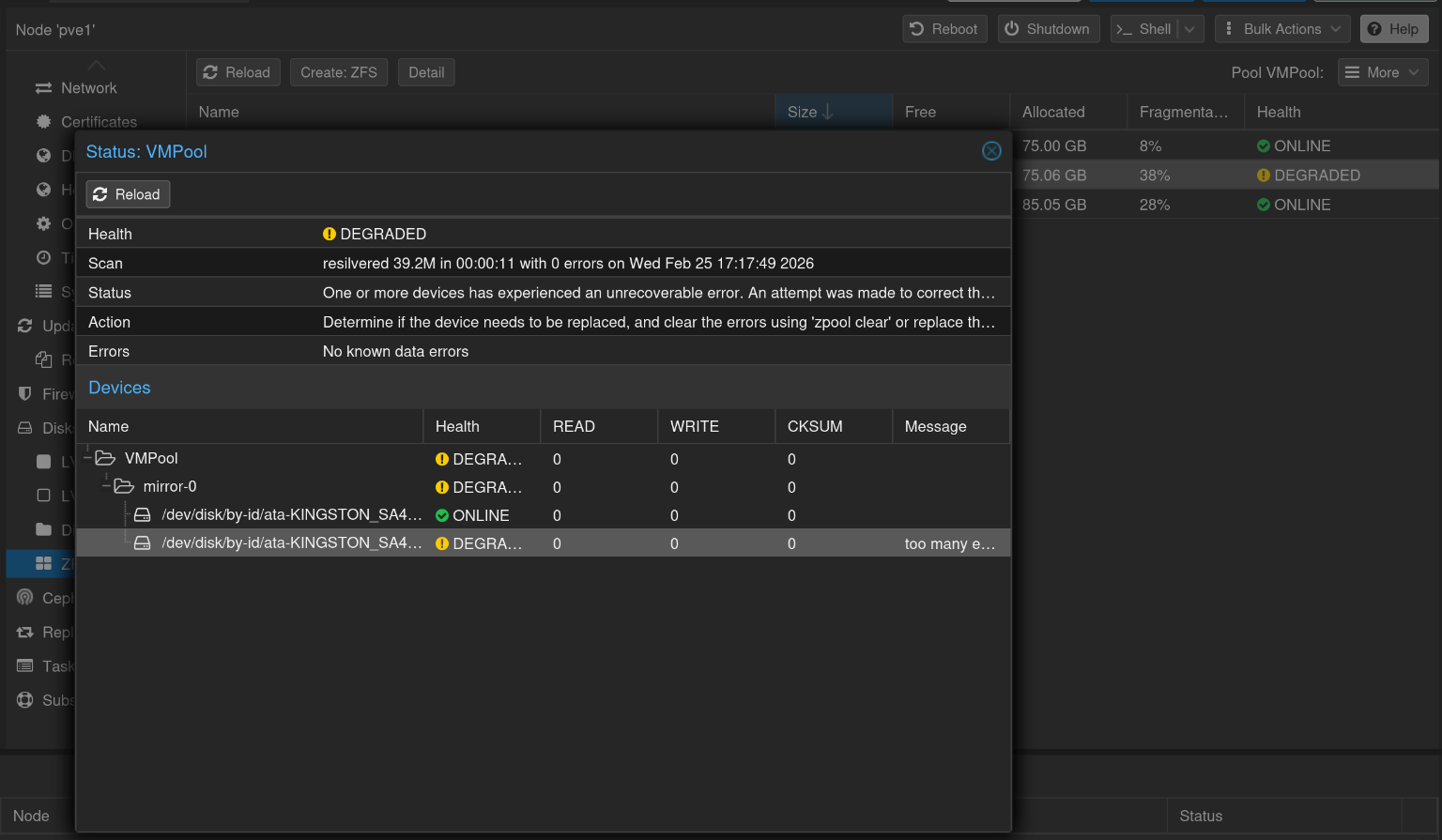
2. The note down the Serial Number of your degraded or failed drive s.t you can go into your machine and take out the failed drive.
3. Then take your new drive and insert it in the failed drive location.
4. Now, what is important is that you need to note down the serial number of the new drive that you have added. Luckily we can just go into Proxmox > Disks and we see an overview of all the disks that are connected to the Proxmox system
5. Then look for your drive in my case that is ata-Samsung_SSD_870_EVO_1TB_S75CNX0WC58810Y which is mount to /dev/sda and the degraded drive is ata-KINGSTON_SA400S37480G_50026B7785A335B4 mounted to /dev/sdc
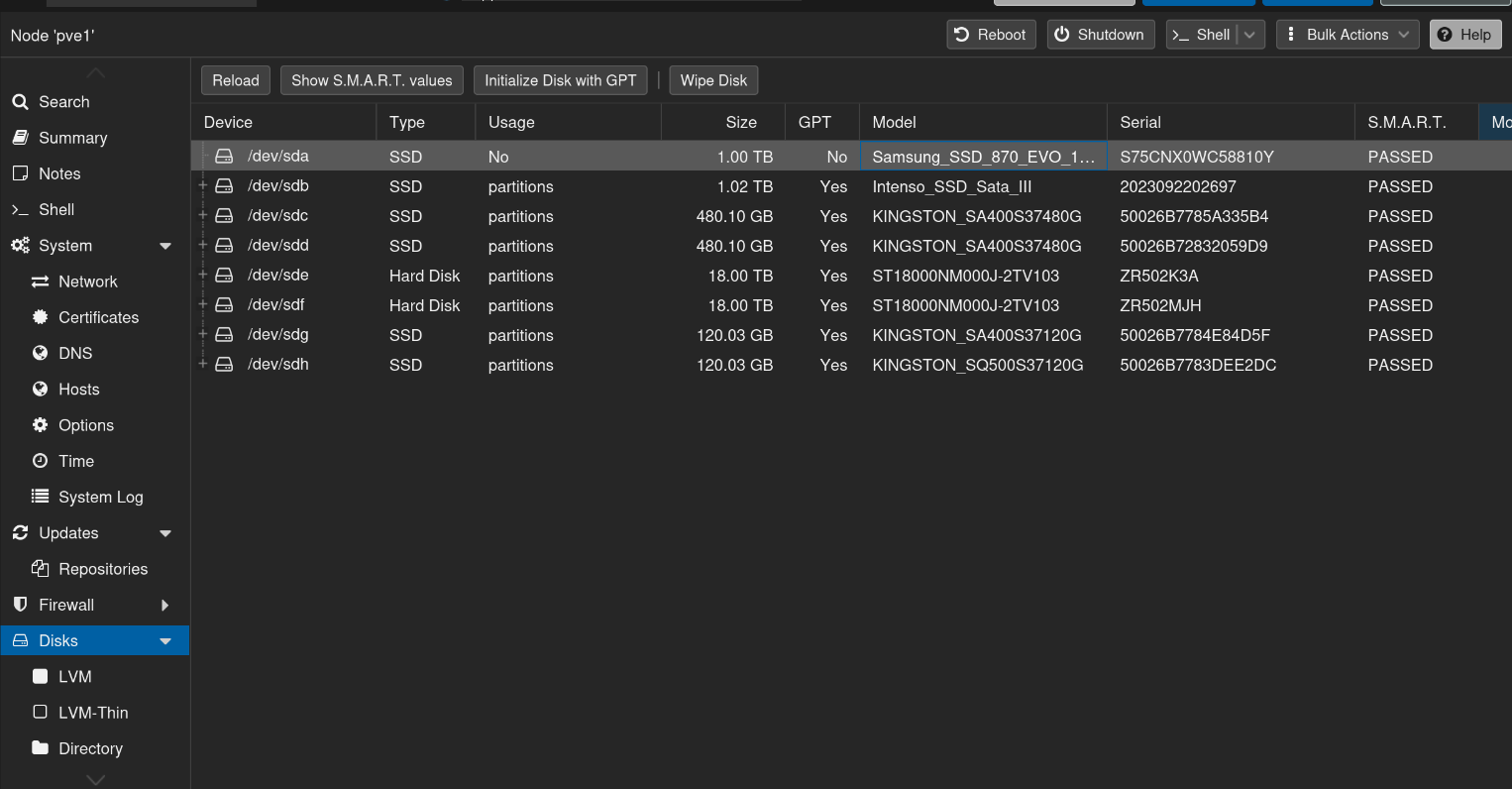
6. Then to make sure everything is removed from the new fresh disk and it is clean you will wipe the disk with the button Wipe Disk.
7. Then we will go into our Shell and use the command sudo zpool status <YOUR POOL NAME>
root@pve1:~# sudo zpool status VMPool
  pool: VMPool
 state: DEGRADED
status: One or more devices has experienced an unrecoverable error.  An
        attempt was made to correct the error.  Applications are unaffected.
action: Determine if the device needs to be replaced, and clear the errors
        using 'zpool clear' or replace the device with 'zpool replace'.
   see: https://openzfs.github.io/openzfs-docs/msg/ZFS-8000-9P
  scan: resilvered 104M in 00:00:01 with 0 errors on Fri Jul  3 22:47:08 2026
config:

        NAME                                            STATE     READ WRITE CKSUM
        VMPool                                          DEGRADED     0     0     0
          mirror-0                                      DEGRADED     0     0     0
            ata-KINGSTON_SA400S37480G_50026B72832059D9  ONLINE       0     0     2
            ata-KINGSTON_SA400S37480G_50026B7785A335B4  DEGRADED     0     0     0  too many errors

errors: No known data errors
8. Note down the disk that has failed or is degraded (ata-KINGSTON_SA400S37480G_50026B7785A335B4 in this case). Then as suggested in the actions we will use the command zpool replace to replace the failed drive.
sudo zpool replace POOLNAME /dev/disk/by-id/old-disk /dev/disk/by-id/new-diskThis will then result in this ;)
root@pve1:~# sudo zpool replace VMPool /dev/disk/by-id/ata-KINGSTON_SA400S37480G_50026B7785A335B4 /dev/disk/by-id/ata-Samsung_SSD_870_EVO_1TB_S75CNX0WC58810Y
root@pve1:~# zpool status VMPool
  pool: VMPool
 state: DEGRADED
status: One or more devices is currently being resilvered.  The pool will
        continue to function, possibly in a degraded state.
action: Wait for the resilver to complete.
  scan: resilver in progress since Fri Jul  3 23:29:16 2026
        69.8G / 69.8G scanned, 513M / 69.8G issued at 257M/s
        501M resilvered, 0.72% done, 00:04:36 to go
config:

        NAME                                               STATE     READ WRITE CKSUM
        VMPool                                             DEGRADED     0     0     0
          mirror-0                                         DEGRADED     0     0     0
            ata-KINGSTON_SA400S37480G_50026B72832059D9     ONLINE       0     0     2
            replacing-1                                    DEGRADED     0     0     0
              ata-KINGSTON_SA400S37480G_50026B7785A335B4   OFFLINE      0     0     0
              ata-Samsung_SSD_870_EVO_1TB_S75CNX0WC58810Y  ONLINE       0     0     0  (resilvering)

errors: No known data errors
root@pve1:~#
9. We can now see that after the replace command that the VMPool is resilvering straight away. Since, it is a mirror zfspool the resilvering process can go really quick.
10. Then you will get a notification via NTFY or Email once the resilvering process is done. If it is a long resilvering process you can check the progress of the resilvering progress by using the zpool status POOLNAME command.
Awesome! You replaced your old drive with a new one ! basically in 15 minutes!! That was not that hard was it ;)
No comments to display
No comments to display