
2. PVE Backup Jobs
On this page we will describe how you can create a backup job on your PVE machine. It is assumed that you have already set up your PBS system and connected your PBS system to your PVE machine as well. With that out of the way we create a backup job to your PBS in the following way
1. From your Dashboard go to > Datacenter > Backup > +Add
2. Then you will be presented with the following screen
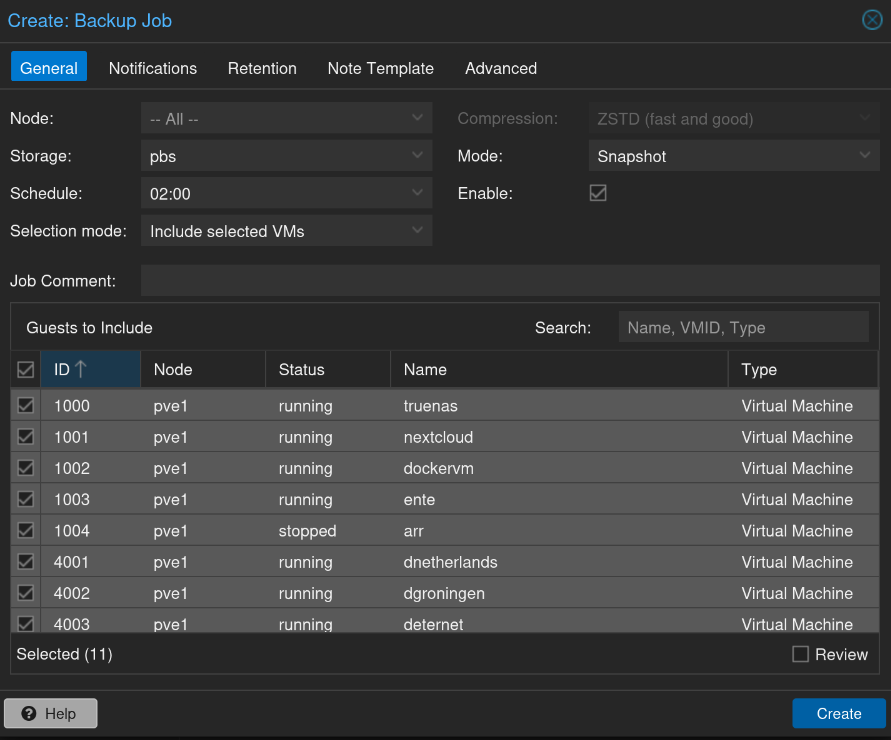
3. Now make sure you select for Storage: PBS and not your local storage
4. Then set a schedule i.e how often you want the backup job to run. So what to choose ? Well I like to make sure that my backups are taken before the Update schedule has run for all my containers in Dockhand. In my situation I have Dockhand checking for updates every day at 03:00 and also update them automatically if it is available. This comes with some risk because automatic updates could break things. Therefore I like to take my backups one hour before. In this situation if I wake up and all is to hell then I can just rewind to the latest backup that was taken at 02:00. So depending on your Update schedule I would recommend to schedule it 1 hour before the update schedule ;)
5. Perfect, now we need to look at retention. That is how long will different backups be kept before they are garbage collected. This is