
3. Emergency Contacts
Source: Emergency contacts
Hopefully it will never happen but in the case something bad happens to you then it would be great that your loved ones can have access to your passwords s.t they can retrieve your digital life. It must be noted that it will provide access to all your folders and passwords. It does not allow access to only specific folders. So if that is something that you want i.e leave a legacy ;) behind then this is what you do
Note! Your emergency contact does need to have a Vaultwarden account on your instance
1. Enter your Vaultwarden account
2. Go to Settings > Emergency access
3. Add a new emergency contact by clicking on Add emergency contact
4. Type in the email your emergency contact has associated with their Vaultwarden account
5. So how does this work ? well once you setup an emergency contact that emergency contact can request you to have access to your vault. Then it is up to you if you approve or deny that request. However, if you are not available anymore for any reason to respond to this request then it would be useless. Therefore, you choose a Wait time. This wait time is the time after the emergency request that the credentials will be given to the emergency contact automatically. If for instance the wait time is 7 days then 7 days after the request your emergency contact will have access to your vault.
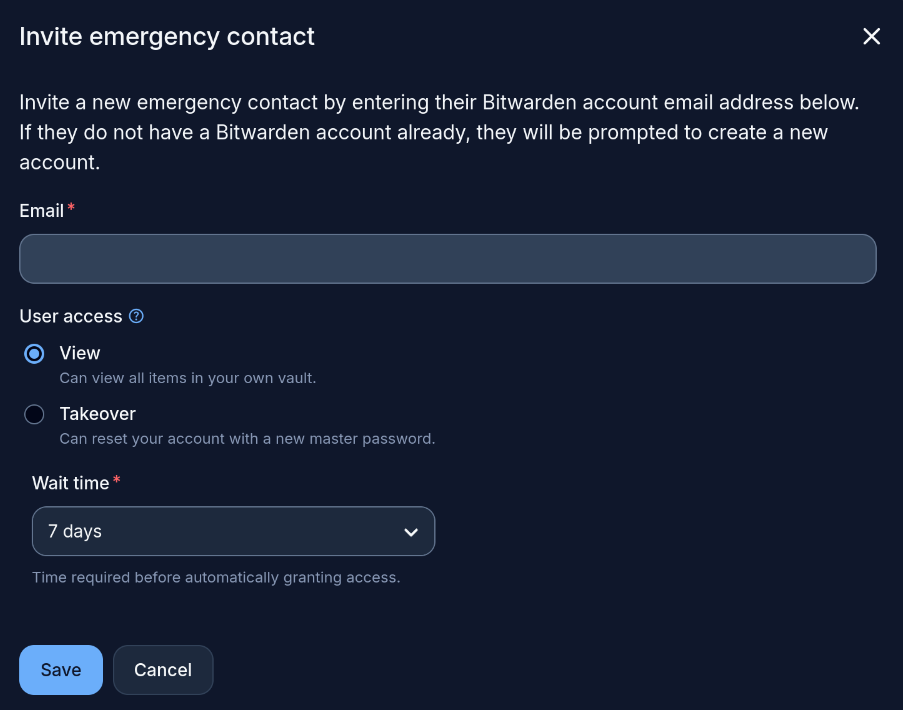
5. After saving an email will be send to the emergency contact that needs to confirm it
6. Once confirmed you will also get an email that your emergency contact approves your request.
7. That's it awesome ! all done ; )
No comments to display
No comments to display