
3. Public Albums
Source: Custom Domains
Ente also provides the possibility to share media with people that are not on Ente yet. This means that you can share single pictures, videos, memories but also whole albums. However, if you self host you need to make sure that you setup you connect your public albums domain name to your Ente server. Then a user on your Ente server will get the correct shared albums link when they want to share a public album
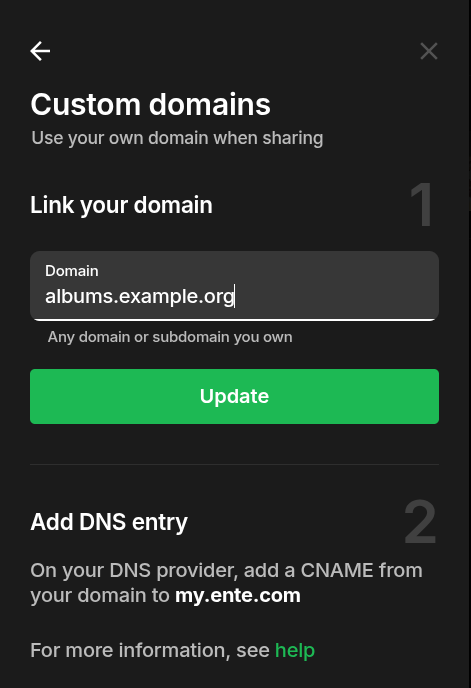 Custom Domain
- Open up your admin Ente account on your desktop or in the webbrowser. At this moment it does not seem to work on the phone app.
- Then go to Settings > Preferences > Custom Domains
- Then fill in your public albums domain.
- You most likely already setup the public albums DNS and Reverse proxy settings but if not the standard port is 3002 and the public link is albums.yourdomain.org.
- Then restart your Ente app on all your devices s.t it synchronizes with your albums domain.
Create a Public Album
- Go to an Album
- Hit the sharing icon in the top right corner
- Then select create public link
- Then select Manage link to adjust the permissions of this public link to your wishes
No comments to display
No comments to display