
01. Architectural Overview
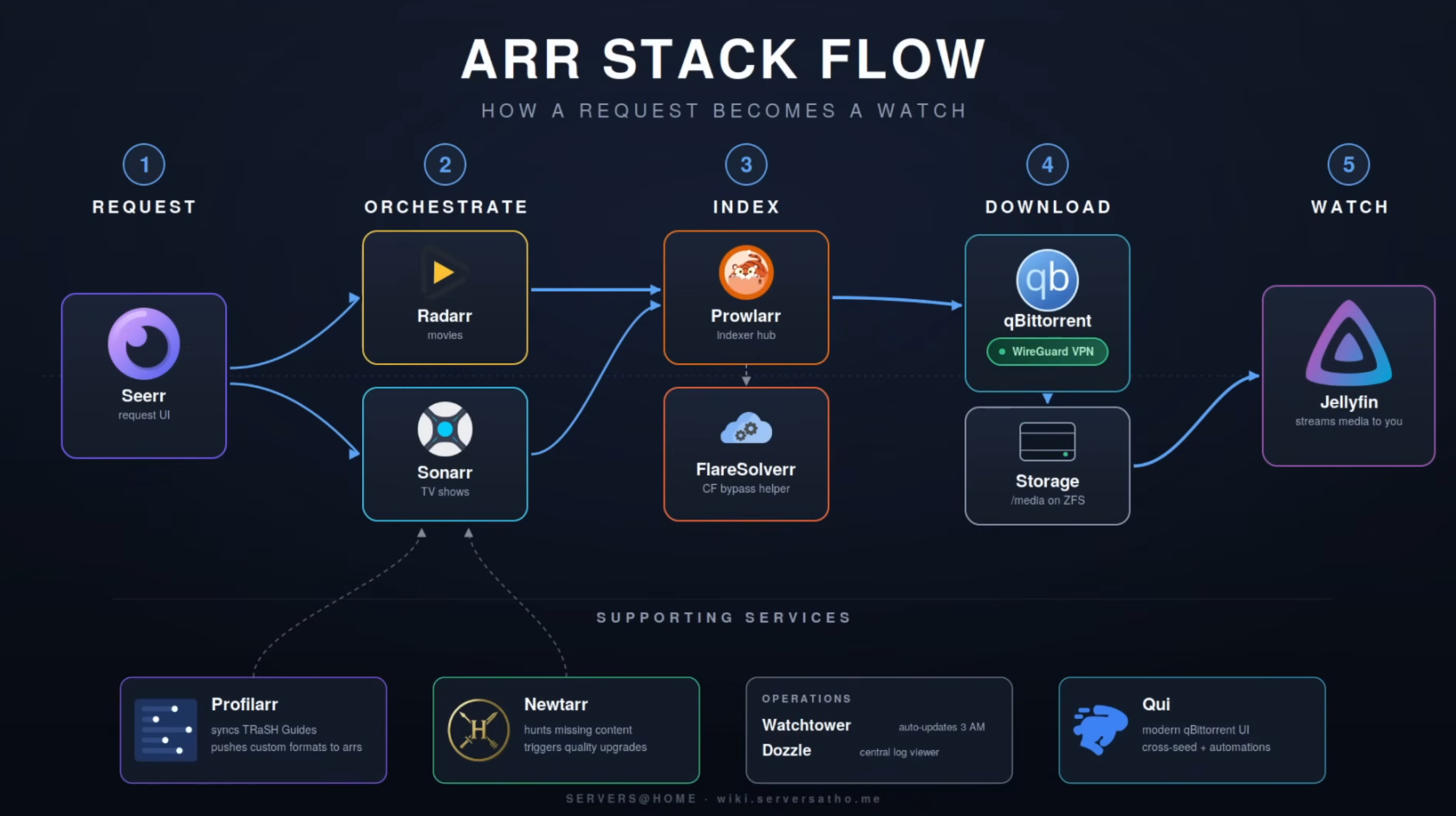
Movie/Show Request
- A user makes a request via Seerr, which is basically a catalogue of all the existing movies and tv shows and upcoming ones. This is where the end user will interact with for requests. Everything else from 2-4 is not publicly accessible. Only 1 and 5 are in the whole process.
- Then the request will end up in Radarr for movies and Sonarr for TV shows.
- Radarr and Sonarr are open-source applications designed for automating the downloading of movies and TV shows, respectively. They help users track their favorite media, automatically search for new episodes or films, and manage downloads through a user-friendly web interface.
Overview of the Request Process
Radarr/Sonarr and Prowlarr work in tandem to automate the downloading of movies. Here’s how the process unfolds:
- Search Request: Radarr/Sonarr initiates a search request for a specific movie/show.
- Querying Indexers: Prowlarr receives this request and queries all its configured indexers.
- Returning Results: The results from the indexers are sent back to Prowlarr.
- Final Decision: Prowlarr then forwards these results back to Radarr/Sonarr, which makes the final decision on which movie/show/episode to download.
Download clients
- After the correct movie/show has been confirmed depending on if its a usenet or torrent file is then send to one of the download clients they are connected to.
- Examples of these download clients are nzbget for usenet and qbittorrent for torrents.
- They go out and download the movies/shows to your hard drives
Front end Jellyfin Clients
List of all Jellyfin clients
Then finally you have multiple front ends that users can interact with to actually watch their movies and shows. Basically Jellyfin sits in the backend and any application that can speak to the Jellyfin API can represent this media how they seem fit. Famous ones I like are
- Fladder for Android Mobile and Laptops (It allows Seerr to be integrated into one application)
- Jellyfin for TV
- Kodi with a sweet theme for the TV
- For iOS devices I would recommend
No comments to display
No comments to display